Book your
Office Day.
Lock in the date for your team. After you submit, we take you to the Square menu — that's the link you share so everyone orders and it closes with one group payment.
How to turn on
group payment.
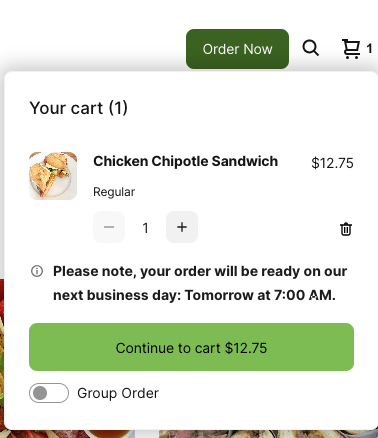
Everyone uses the same link. The one thing that matters is turning on Group Order in the cart — that way each selection adds up instead of replacing the last one.
Add it to the cart like any normal order.
It sits under the green cart button. This is the step that keeps everyone else's orders alive.
Everyone repeats the same steps and their picks add to the same cart.
Once everyone has ordered, the full cart is paid in a single transaction.
Important: Square doesn't allow separate payments inside one group order. Ordering is individual, but payment always closes as a group — one charge, one delivery.
After you submit, we take you to the Square menu. It's the same link for the whole team — payment closes as a group.